

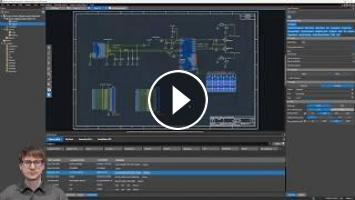
The schematic is almost done. In this video, add the main ESP32 controller, the voltage regulator, and the status LED, finishing up every circuit needed before moving into layout. Along the way, learn several System Capture power tools for fast net renaming, component replacement, and design navigation that will save hours on any real project.
This is part four of the How-To Allegro X series, completing the schematic for the ESP32 dev board.
Download the files here: http://cdn.cadence.com/allegro/SYSCAP_HOWTO_DEMO_ENVIRONMENT.zip
In this video:
00:00 – Intro: finishing the schematic before layout
00:48 – Renaming and reorganizing pages
01:12 – Placing the ESP32, voltage regulator, and LED components
02:10 – Wiring the voltage regulator’s input, output, and ground
03:10 – Adding input and output capacitors
03:56 – Using the Replace feature to swap components without losing the reference designator
05:21 – Connecting ESP32 ground pins
06:02 – Drawing stubs for IO pins using selection filters
07:02 – Using global Find and Replace to rename nets (IO to GPIO)
08:28 – Reviewing find and replace scope settings (page vs. design)
08:58 – Using Find Results and Edit Externally for bulk net renaming in Notepad++
10:39 – Using Navigate to trace signal connections across pages
11:34 – Adding special IO symbols and setting input/output direction
12:01 – Wiring the enable pin, pull up resistor, and filter capacitor
13:18 – Connecting the LED data, power, and ground pins
14:21 – Adding a pull up resistor and understanding X-Nets
15:33 – Adding the power indicator LED and current limiting resistor
16:34 – Wrapping up and previewing the next steps
What you’ll learn:
✅ How to use the Replace feature to swap a component in place while keeping its reference designator
✅ How to use selection filters to draw wire stubs for only specific pins, rather than an entire component
✅ How to use global Find and Replace, including page-specific scope settings, to rename large groups of nets at once
✅ How to use Edit Externally to bulk edit net names in a text editor like Notepad++
✅ How to use the Navigate feature to trace a signal’s connections across multiple schematic pages
✅ How to place a resistor directly on a wire to create an X-Net without redrawing connections
✅ How to fully wire a voltage regulator, enable pin filtering, and an addressable LED circuit
Try Allegro X free for 30 days: https://ow.ly/C4aW50YerAy
Subscribe to our Channel: youtube.com/@CadencePCBDesignandAnalysis?si=sRz2wbFXC5B0-dOX
Follow us on social for the latest OrCAD X news!
This is part four of the How-To Allegro X series, completing the schematic for the ESP32 dev board.
Download the files here: http://cdn.cadence.com/allegro/SYSCAP_HOWTO_DEMO_ENVIRONMENT.zip
In this video:
00:00 – Intro: finishing the schematic before layout
00:48 – Renaming and reorganizing pages
01:12 – Placing the ESP32, voltage regulator, and LED components
02:10 – Wiring the voltage regulator’s input, output, and ground
03:10 – Adding input and output capacitors
03:56 – Using the Replace feature to swap components without losing the reference designator
05:21 – Connecting ESP32 ground pins
06:02 – Drawing stubs for IO pins using selection filters
07:02 – Using global Find and Replace to rename nets (IO to GPIO)
08:28 – Reviewing find and replace scope settings (page vs. design)
08:58 – Using Find Results and Edit Externally for bulk net renaming in Notepad++
10:39 – Using Navigate to trace signal connections across pages
11:34 – Adding special IO symbols and setting input/output direction
12:01 – Wiring the enable pin, pull up resistor, and filter capacitor
13:18 – Connecting the LED data, power, and ground pins
14:21 – Adding a pull up resistor and understanding X-Nets
15:33 – Adding the power indicator LED and current limiting resistor
16:34 – Wrapping up and previewing the next steps
What you’ll learn:
✅ How to use the Replace feature to swap a component in place while keeping its reference designator
✅ How to use selection filters to draw wire stubs for only specific pins, rather than an entire component
✅ How to use global Find and Replace, including page-specific scope settings, to rename large groups of nets at once
✅ How to use Edit Externally to bulk edit net names in a text editor like Notepad++
✅ How to use the Navigate feature to trace a signal’s connections across multiple schematic pages
✅ How to place a resistor directly on a wire to create an X-Net without redrawing connections
✅ How to fully wire a voltage regulator, enable pin filtering, and an addressable LED circuit
Try Allegro X free for 30 days: https://ow.ly/C4aW50YerAy
Subscribe to our Channel: youtube.com/@CadencePCBDesignandAnalysis?si=sRz2wbFXC5B0-dOX
Follow us on social for the latest OrCAD X news!
- Категория
- Схемы по заработку в интернете

Комментариев нет.
Следующее
Auto
-
04:10

Arcade Archives 2 TEKKEN 100% Achievement Walkthrough * 1000GS in 15-20 Minutes *
-
00:15
Giải mã các triệu chứng cơ thể kỳ lạ #affiliatemarketing #tintuc #mohinhkinhdoanhaffiliate
-
20:20
Libra! YES! YOU'RE FINALLY READY TO REVEAL THÈ TRUTH! 2222
-
08:03
700 Part Schematic? Here's How to Find Anything in Seconds
-
02:10
Nghỉ Sinh Vẫn Có Thể Làm Affiliate? Cơ Hội Kiếm Thu Nhập Cho Mẹ Bỉm
-
12:01
How To Use AI Like Professional Movie Studios In 2026 - Complete Step By Step Tutorial & Walkthrough
-
00:17
Validate Your Schematic in Altium Before PCB Layout
-
01:42
Không cần quay video vẫn có thể làm được Affiliate | Big Man Marketing
-
02:49
Blazor Diagram: Annotations Feature Walkthrough
-
01:22
Làm Affiliate theo hướng MMO là như thế nào? | Big Man Marketing
-
05:33

ЗАРАБОТОК В ИНТЕРНЕТЕ | КРУТАЯ СХЕМА | FUNPAY
-
08:12

Пассивный Заработок 1000Р в День в Интернете на Телефоне Без Вложений
-
06:43

Как ЗАРАБОТАТЬ ШКОЛЬНИКУ в ИНТЕРНЕТЕ? Самые Легкие Способы Заработка
-
07:05

ЗАРАБОТОК В ИНТЕРНЕТЕ 2023 | Реальный заработок в интернете с вложением | Как заработать в интернете
-
05:49

ЗАРАБОТОК В ИНТЕРНЕТЕ 2023 | Реальный Заработок В Интернете С Вложением. Как Заработать В Интернете?
-
04:28

Схема заработка 2023 ! Зарабатываем в интернете онлайн сидя дома ! Заработок денег ! Деньги легко !
-
05:33

ЗАРАБОТОК В ИНТЕРНЕТЕ | КРУТАЯ СХЕМА | FUNPAY
-
06:43

Как ЗАРАБОТАТЬ ШКОЛЬНИКУ в ИНТЕРНЕТЕ? Самые Легкие Способы Заработка
-
14:53

Показываю Как Зарабатывать Деньги - Заработок В Интернете 2023 Рабочая Схема Для Заработка
-
14:12

Большой Заработок В Интернете С Выводом Рабочая Схема Заработка
 Загрузка...